Building a Website Page - Main Contents

Toms Main Section
So lets have a look at all the elements that have gone into making the main part of this front page starting from the top we'll look at it section by section.
Section 3. ‐ Card Panel
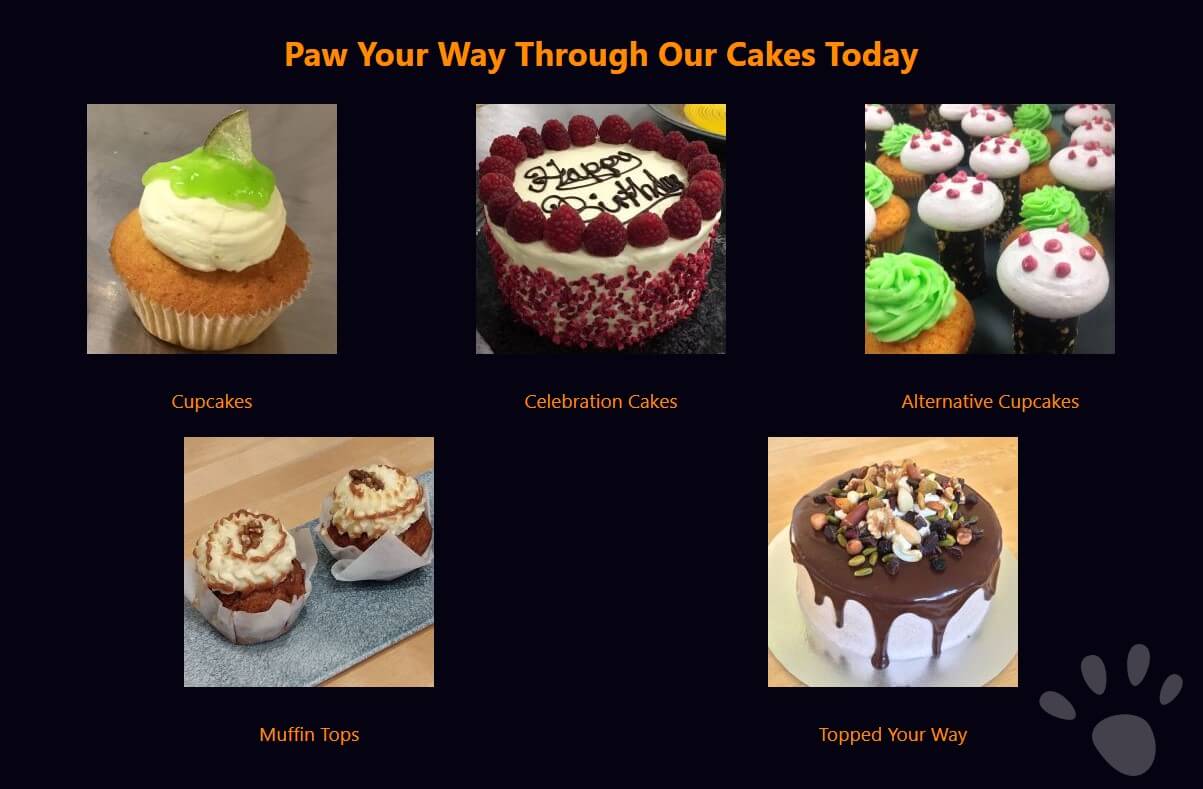
This next section is made up of a panel of cards. A card refers to a design style where information is laid out and contained in a boxed shape, typically with the contents in a column direction giving it the outline shape of a playing card.
What's a Card Panel?
The card panel is a div that contains a number of div's (cards) each containing a similar collection of information. Typically a card can contain a title / heading, an image or block of text and often a text link or styled button.
<div class="card_panel">
    <div class="card">
        <div class="card_img">
            <img src="limecupcake_sm.jpg">
        </div>
        <div class="card_text">
            <p>Cupcakes</p>
        </div>
    </div>
    ...
</div>
How I Made Tom's Cards
The html of our cards looks like this. First we have an outer div with a class name "card_panel". With CSS I've added both a dark blue background colour and a watermark paw SVG positioned in the bottom right corner.
Inside this is another div with the class name "card", everything within this div is the cards contents.
This card contains two div's, first called "card_image" where we have an image of a cake and second "card_text" where we have put a descriptive title regarding the image.
I have then repeated this "card" pattern five times within the "card_panel" giving each one a different image and text.
At present these cards are only being used to display the range of products Tom's bakery makes. But they could be adapted in the future to link to new pages e.g. the Cupcakes card would take you through to a cupcake product information page. Or maybe if he decides to either sell or provide an ordering service online then an "Buy Now" or "Order Now" button could be added taking you through to a shopping cart system.
Section 4. ‐ Customer Reviews

Here we have a second text area in the same layout as in Section 2 with an image first and making the text central again. This text area I have used to add some fictional reviews as genuine customer reviews are an excellent way of letting new customers know how great people think your product is.
These sections on a website can either be like here where I've taken a sample of good reviews from elsewhere and manually added them. Or you could inject into your website current ones e.g. Google Reviews, though you would then have no control over which customer review is being displayed so could end up showing a less flattering one, as you can't please everyone all of the time!
Anyone recognise the names in Tom's customer reviews? You may (if your above a certain age!) recognise them as a couple of cartoon characters from a little while ago who maybe have a connection to TC.